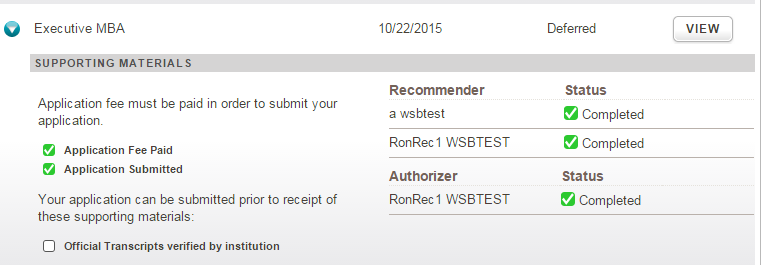
How to update the application status for a deferred applicant.
During the end of the year rollover, any application in the status of AD-Deferred will be automatically rolled over to the next Fall term.
The following fields are highlighted in the screenshot below:
- 'Term Created' is the term when the application was created
- 'Term Applied' is the active application term
Follow these steps to update the status of a deferred application:
1. Request the deferral decision from the applicant via email or other communication. It may be helpful to track this activity in LRM.
- If an enrollment deposit has already been paid, please follow the necessary steps to credit this deposit to the student's tuition account.
2. When the applicant communicates their decision, use the buttons on the Application Record to update the application status in LRM.
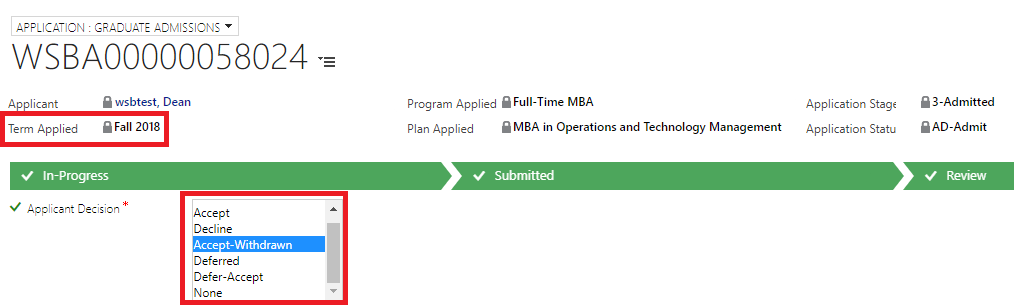
- In the Application Decision dropdown, choose Deferred
- Click the "Next" on the Application BPF ( Ribbon)
- If this application is at the deferred (AD-Deferred) status before the annual rollover, the rollover will update the "Term applied" during the process. Otherwise, Go to the administration tab of that application, and change the "term applied" to the intended term.
- Double-check if the "Term applied" is correct and Application status = "AD-Deferred"
3. IMPORTANT: The application will have to be exported to SIS if not so or get updated in SIS to the new term, so that the student can be formally matriculated. Remember to ask the applicant to pay the enrollment deposit, and then change the LRM/SIS application status to "Accept" when a deferred applicant has notified the PO of their acceptance.
The applicant can log into the application system to see their Deferred status and view the admissions letter from the previous year.
However, the applicant CANNOT use the application system to notify the admissions office of their final decision.
Application status changes for deferred applicants must occur manually by the program office using the admissions decision buttons available in LRM.
- When the year comes, the program office needs to log into the LRM, and use the BPF Ribbon to change the application status back to "Accept."
- The application status change should trigger the workflow to send the applicant a congratulatory email. If you do not want the applicant to receive those emails, please change their email before your operations, and change it back once you are done!
- If you want the application status to be admit-defer-accept, please reach out to the LRM team to change it in the System fields section.