
Grainger Hall Event Services Overview
Whether you need a meeting space for a few hours or a few days, the Wisconsin School of Business offers a full range of event planning services. Our team will help you select a space, arrange for audio/visual services, and provide catering to meet your needs and budget. For more details, please visit https://bus.wisc.edu/about-us/event-services or review the Event Services Overview guide below. Below you will also find guides to using Virtual EMS.
Contact Information
2266 Grainger Hall
975 University Avenue
Phone: 608-262-8679
Email: graingerevents@wsb.wisc.edu
Hours
Office Hours: 7:45 am - 4:30 pm, Monday through Friday
Information Desk Hours: 7 am - 9 pm, Monday through Thursday; 7 am - 7 pm, Friday; 7 am - 6 pm, Saturday; 12 noon - 7 pm, Sunday
Information Desk
Event Services manages the WSB Information Desk, located in the East Atrium. The Information Desk directs incoming phone calls and visitors to Grainger Hall, handles all lost and found, catering pick-up station and students manages all event setup and tear downs. Student staff that work the Information Desk have a wealth of knowledge of the building and can assist with a variety of things.
Event Room Usage - WSB Departments
Classrooms and conference rooms are all free for internal WSB departments to utilize, but must be reserved through Event Services/Virtual EMS.
Free room usage will follow these guidelines:
- Event Services will not adjust the room from "standard setup"
- If a different room setup is needed, a setup fee will be applied
- Prior to your arrival to your reserved room, you should expect the following:
- The room in standard setup
- Tidy and clean spaces and tables
- Functioning AV
- When leaving the reserved room please confirm the following:
- lights off
- garbage thrown away
- white boards/chalk boards wiped if utilized
- please throw away any bad markers
- sign-out of in-room computer and turn off AV
- reset any adjustments to the room setup
- notify Event Services if there are any issues with the room
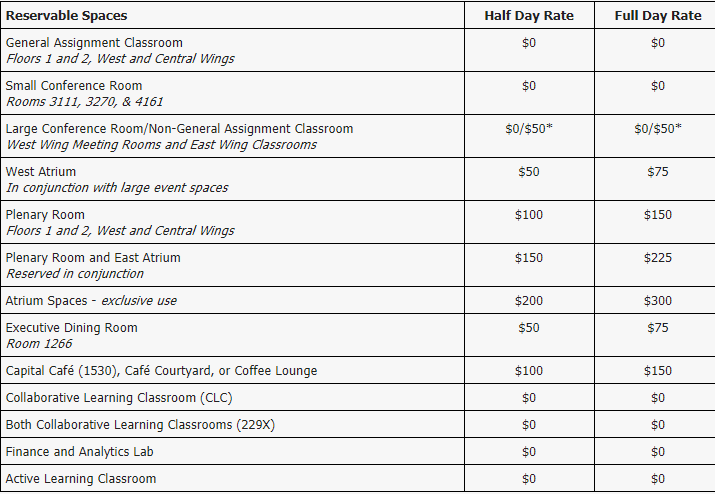
Below is the complete list of room charges for WSB Departments.
Academic Room Usage - WSB Departments
All academic related room needs should be directed to Academic Affairs who will assist with reservations - acadaffairs@wsb.wisc.edu
Academic planners
- Dana Outhouse, 826-5339, dana.outhouse@wisc.edu
- Brigid Patterson, 263-5015, brigid.patterson@wisc.edu
User Guides
Event Services Overview Guide
Virtual EMS - New User Registration
Virtual EMS - How to Create a Reservation